Ohmyfin's Sanctions & Export Check is now on the Odoo Apps store, for Odoo 18, Odoo 19 and Odoo 20. It checks a sales order at the moment someone presses Confirm: the customer and the delivery address against more than 300 sanctions lists, among them OFAC's SDN list, the EU consolidated list, the UK list and the UN lists; the destination country against embargoes and country restrictions; and every order line against export controls by its HS code. Odoo already holds all three, so nobody types anything in.
The goods check is the part that rests on a customs code. Since 20 March 2024 an EU exporter selling a common high priority item to a buyer outside the EU's partner countries must put a clause in the contract that prohibits re-export to Russia, and since 26 December 2024 it must also carry out due diligence for such sales, proportionate to its size (Regulation (EU) No 833/2014, Articles 12g and 12gb). The European Commission publishes the common high priority items as six-digit HS codes, and Odoo stores an HS code and a country of origin on each product. The data the rule asks about is already on the order line.
What happens when an order is confirmed
| Result of the check | What Odoo does |
|---|---|
| The customer or the ship-to party is listed, the destination is under a comprehensive embargo, or the goods are prohibited for that destination | The order is not confirmed. The reasons are on the order, under "Trade check". |
| A potential match, goods that may need an export licence, or a common high priority item going outside the partner countries | The order waits until a user in the group "Ohmyfin: compliance reviewer" writes a reason and presses "Release and confirm". The reason and the report number stay on the order and in its chatter. |
| No findings | The order is confirmed at once, and the report number is kept. |
| A line with no HS code | It reads "not goods-screened", never a pass, with a link to the products that miss a code. |
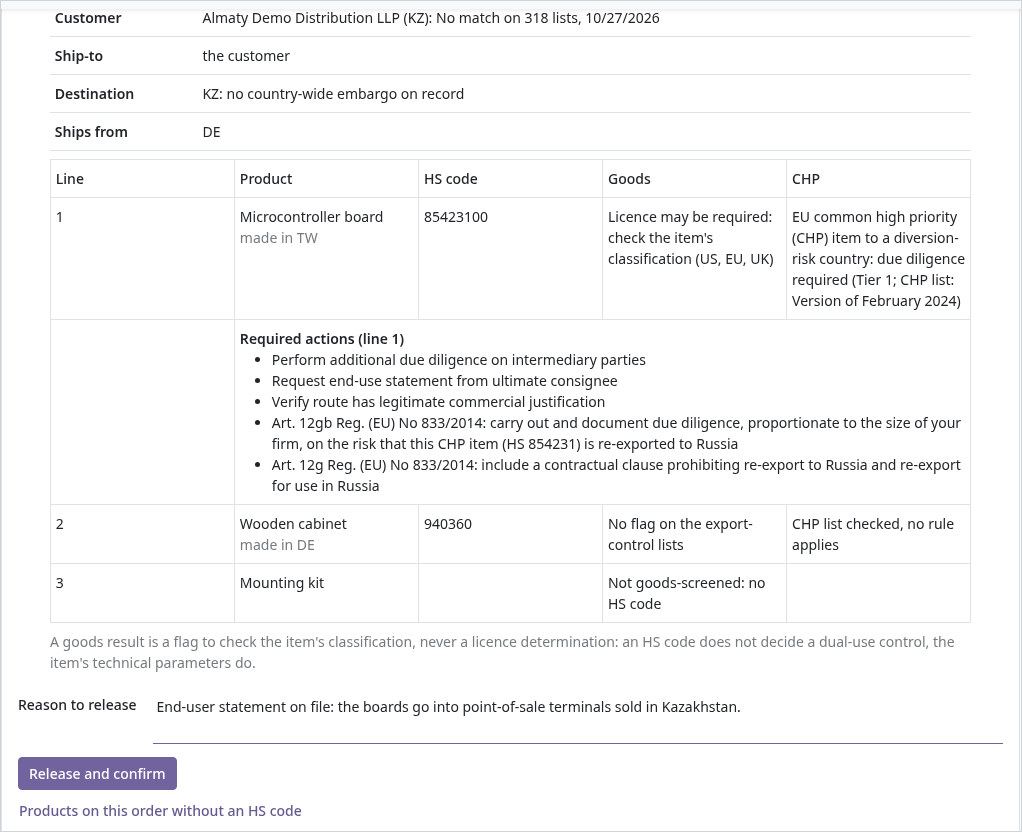
A goods result is a flag to check the item's classification, never a licence decision: an HS code does not decide whether an item is dual-use, its technical parameters do.
Contacts, vendor payments and bank details
- Contacts. Every company and person gets a Screen button and a status: "No match on N lists" with the date, "Potential match" or "Listed". A contact is screened again when its name, type or country changes.
- Outgoing payments. When a payment to a vendor is posted, the payee is screened if it has not been in the last 30 days, or its details have changed since. A listed payee is refused. A potential match waits for a reviewer's reason, which is kept on the payment.
- Vendor bank accounts. The BIC is looked up when it is saved, with the bank's name and country, and the app warns when the BIC is unknown or its country differs from the IBAN's.
What it sends, and what it costs
Nothing leaves the Odoo database until an administrator saves an Ohmyfin API key and ticks a consent box in Settings. The box names what is sent: contact names and countries, the delivery country, and each product's HS code and country of origin. Prices, quantities and documents are not sent. If a check cannot run, the order or the payment goes through with "not screened" and the reason in its chatter, unless the switch "Refuse when the check cannot run" is on.
The app itself is free and open source (LGPL-3). The checks are answered by the Ohmyfin API: 10 a day with an Ohmyfin account and no plan, 100 a day on any paid plan. The same screening is on the web at ohmyfin.ai/sanctions.
How to install
It installs on Odoo 18, 19 and 20, Community and Enterprise, on your own server or on Odoo.sh. Odoo Online does not install third-party apps, so it is not available there.
- Open the listing for your version on the Odoo Apps store: Odoo 18, Odoo 19 or Odoo 20. On your own server, press "Download", unzip the module into a folder on your addons path and restart Odoo. On Odoo.sh, press "Deploy on Odoo.sh". The store asks you to sign in with an Odoo.com account.
- In Odoo, open Apps with developer mode on and choose "Update Apps List". Remove the "Apps" filter from the search, look for "Sanctions & Export Check" and press Activate.
- Create an API key on the API page of your Ohmyfin profile. Every registered account can create one, and with no plan it answers 10 checks a day.
- In Odoo, open Settings, then "Sanctions & Export Check": paste the key, tick the consent box and save. Add the people who release held orders and payments to the group "Ohmyfin: compliance reviewer".
- Open a customer and press Screen on its "Sanctions screening" tab, or confirm a sales order. The result is under "Trade check" and in the chatter.
The goods check reads the product fields "HS Code" and "Origin of Goods", which Odoo adds with its shipping features; without them the app checks the parties and the destination, and each line reads "not goods-screened".
Need help with implementation, or on Odoo Online and cannot install the module? Let us know and we will find a solution.